Happy Birthday Card Design with EPS Files
When it comes to creating a Happy Birthday Card that stands out, the choice of file format can make all the difference. One of the most versatile and high-quality options available is the EPS (Encapsulated PostScript) file. Whether you're designing for personal use or launching a handmade business, understanding how EPS files work and their benefits can elevate your creative projects significantly.
What Are EPS Files?
EPS files are vector-based graphic formats that allow for scalable, high-resolution images. Unlike raster images such as JPEGs or PNGs, which are made up of pixels, EPS files use mathematical equations to define shapes, lines, and colors. This means they can be resized without losing quality, making them ideal for a wide range of applications.
For those who have ever struggled with image distortion when resizing graphics, EPS files offer a reliable solution. When you create a Happy Birthday Card using an EPS file, you can confidently scale it to fit any size—whether it's a small greeting card or a large banner for a party.
Why Use EPS Files for Your Happy Birthday Card?
The advantages of using EPS files extend beyond just scalability. They are also compatible with a variety of design software, including Adobe Illustrator CC, Adobe Suite, Inkscape, Corel Draw, and more. This compatibility ensures that your Happy Birthday Card design remains flexible and adaptable across different platforms and workflows.
Moreover, EPS files support both vector and bitmap elements. This dual capability allows you to incorporate detailed illustrations, photographs, and text into your design seamlessly. For instance, you could create a hand-drawn illustration of a birthday cake in vector form and overlay a photo of a celebration in bitmap format—all within a single EPS file.
Another key benefit of EPS files is their ability to maintain sharp edges and clean lines even when printed at high resolutions. This makes them particularly well-suited for print projects, such as custom-designed cards, signage, and promotional materials. If you're running a handmade business, the precision and clarity of EPS files can help you deliver professional-looking products consistently.
Creating a Happy Birthday Card with EPS Files
Designing a Happy Birthday Card using EPS files involves a few simple steps. First, choose a design tool that supports EPS export. Adobe Illustrator is one of the most popular choices due to its robust features and widespread use in the design community. However, free alternatives like Inkscape also provide excellent functionality for creating vector graphics.
Once your design is complete, you can export it as an EPS file. It's important to ensure that all elements are properly grouped and layered before exporting to avoid any issues with alignment or formatting. You can also include text, shapes, and other design elements directly within the EPS file, making it easy to edit and reuse in future projects.
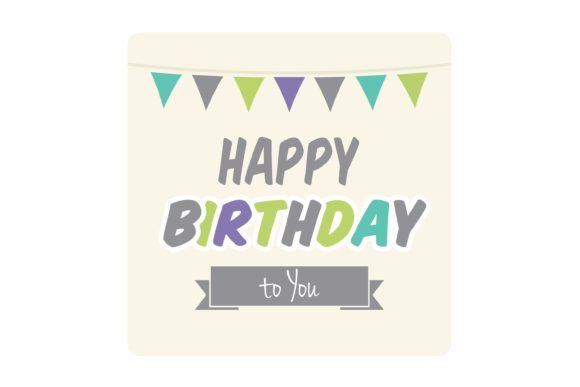
If you're new to working with EPS files, it might be helpful to start with a simple design. For example, you could create a basic layout featuring a "Happy Birthday" message, some decorative elements, and a background pattern. As you become more comfortable, you can experiment with more complex designs and add interactive elements like buttons or hover effects if supported by your design software.
Applications Beyond the Happy Birthday Card
While the Happy Birthday Card is a common use case for EPS files, these versatile formats can be applied to a wide range of creative projects. From personalized merchandise like shirts and mugs to custom wood signs and party decor, EPS files offer endless possibilities.
For instance, you could design a set of reusable templates for different types of Happy Birthday Cards, each with unique themes and styles. These templates can then be used to create a variety of products, from digital downloads to physical prints. By leveraging the scalability of EPS files, you can ensure that your designs remain consistent across multiple formats and mediums.
In addition to personal use, EPS files are also valuable for businesses. If you're running a handmade product line, having access to high-quality, scalable graphics can help you produce items that meet customer expectations while maintaining a professional appearance. Whether you're selling on Etsy or creating custom gifts for clients, the flexibility of EPS files can streamline your workflow and enhance your offerings.
Choosing the Right Software for EPS File Creation
While there are several software options available for creating EPS files, the choice ultimately depends on your specific needs and skill level. Adobe Illustrator is widely regarded as the industry standard for vector graphic design, offering advanced tools and features that cater to both beginners and professionals.
If you're looking for a more budget-friendly alternative, Inkscape is an excellent open-source option that provides many of the same functionalities as Adobe Illustrator. Its user-friendly interface and extensive documentation make it a great choice for those who want to explore vector design without a steep learning curve.
Corel Draw is another popular choice, especially among designers who prefer a more intuitive workspace. It offers a wide range of tools for creating and editing vector graphics, making it a solid option for both personal and commercial projects.
Regardless of the software you choose, it's essential to familiarize yourself with the export settings for EPS files. Ensuring that your design is exported correctly will help preserve the quality and integrity of your work, whether you're printing it or sharing it digitally.
Conclusion
Using EPS files for your Happy Birthday Card design opens up a world of creative possibilities. Their scalability, compatibility, and versatility make them an invaluable asset for both personal and professional projects. Whether you're crafting a simple card or launching a handmade business, understanding the benefits of EPS files can help you achieve exceptional results with ease.